Visual Timers
The best visual timers for children who can't see time the way clocks show it
Disappearing-disk timers, traffic lights and Pomodoro cubes that turn abstract minutes into something a child can actually watch and trust.
Written by Sarah M.
Contains affiliate links
Updated April 2026
If your child has ever melted down when you said "two more minutes," it isn't because they're being difficult; it's because for a lot of neurodivergent children, time is genuinely invisible. Time blindness is one of the most common ADHD and autism traits, and it's at the heart of so many daily flashpoints — homework, screen time ending, getting out of the door for school. I'm not an OT, I'm a parent, but visual timers are one of the few tools the OT recommended on day one that has actually stuck. We use them for Jude's ADHD homework sessions and for Ella's transitions home from school during restraint collapse moments. They're cheap, they're portable, and they do something a verbal countdown can't: they let a child see the time without having to read a clock. And if you want to formally request that school use a visual timer as a reasonable adjustment, my SEN Letter Bundle has an editable letter for that.
Five timers that make time visible
Five visual timers worth considering, ranked from the OT-recommended classic to the budget cartoon model and the homework-focused Pomodoro cube.
#1 Top Pick
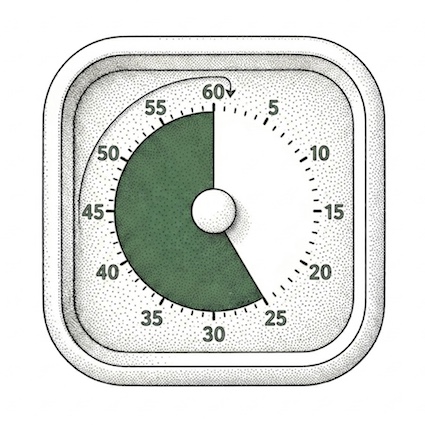
This is the original. The Time Timer's shrinking red disk is the visual-timer format every other product copies, and there's a reason occupational therapists and SENCOs name this brand specifically. The design is intuitive enough that a four-year-old can read it, the construction is sturdier than the cheaper alternatives, and the alarm is gentle rather than the harsh beep cheaper timers default to. The 8.8cm cube is desk-sized without feeling toy-like, and the silicone case can be swapped between four colours, which is more useful than it sounds — assigning blue to homework and orange to screen time means the timer itself becomes part of the routine. Yes, it's the most expensive option here. It's also the one that most reliably becomes a permanent fixture rather than something that drifts to the back of a drawer.
Pros
- The OT-recommended brand: school-familiar
- Disappearing red disk works at any age
- Optional alarm for sound-sensitive children
- Swappable silicone cases (four colours)
- Sturdier build than cheaper copies
Cons
- Most expensive option on this list
- Requires AA battery (not included)
- 60-minute maximum (a limit, not a flaw)
Check Price on Amazon →
#2
A different mental model from the disappearing-disk format, and a useful one for younger children who don't yet read clock faces. The MeesMeek shows time in three colours: green for go, amber as a warning, red when time's up. That maps onto how children are already taught to think about transitions ("we'll stop on red"), which makes it especially helpful at the wobbliest end of the day, when something like sensory overload can turn a verbal warning into a meltdown. The customisable amber period means you can extend the warning phase for children who need a longer runway into a transition. USB-C rechargeable rather than battery, child lock to stop curious fingers reprogramming it, and a memory function that saves the last setting. The 17cm height makes it more visible across a room than the cube-style timers, which suits classroom use.
Pros
- Traffic-light format works pre-reading age
- Customisable amber warning period
- USB-C rechargeable (no batteries)
- Child lock and memory function
- Visible across a classroom
Cons
- Larger footprint than cube-style timers
- More buttons to learn than a Time Timer
- Newer brand: less long-term review data
Check Price on Amazon →
#3
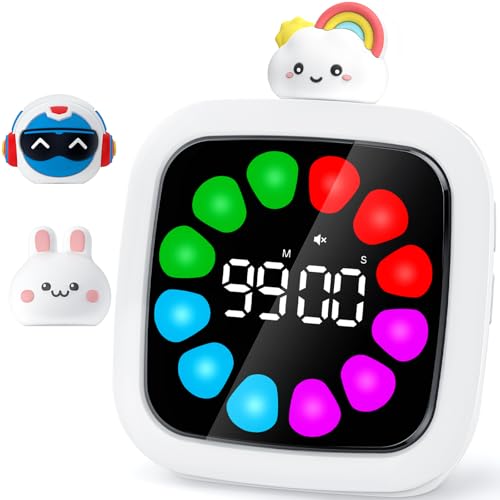
The highest-rated timer here, and probably the best all-rounder if the Time Timer is outside your budget. The Yunbaoit shows time as a ring of colour blocks that disappear one by one — softer and friendlier than the Time Timer's medical-looking red disk, which suits some children much better. You set the time by rotating the cute character on top, which is the right kind of friction (easy enough to do quickly, fiddly enough that a younger child won't keep resetting it). Nineteen ringtones including white noise and gentle melodies is useful — children with auditory sensitivities can have a soft chime, while a child who needs a clear signal can have a louder one. Pause and memory functions, custom colour blocks if you want to DIY a display, and 25+ hours per charge. At under £20, it's the best value premium-feel option on Amazon UK right now.
Pros
- Highest rating on this list (4.7)
- Petal-style display reads softer than red disk
- 19 ringtones suit different sensory profiles
- 99-minute max for longer sessions
- Pause and memory functions
Cons
- Adjustable in minutes only, not seconds
- Cute character may feel too young for older children
- More buttons to learn than Time Timer
Check Price on Amazon →
#4
If the Time Timer is the gold standard, the LIORQUE is its budget twin. Same disappearing-disk concept, classic mechanical countdown (turn clockwise to set), at roughly half the price. The cartoon design is friendlier for younger children — Ella warmed to this one faster than she would have to a clinical-looking timer. The pause function is a meaningful upgrade over many cheap mechanical timers, which only run continuously. Adjustable volume and a choice between 5-second and 30-second alarm durations means you can tune it to a child who's auditory-sensitive. At £12–£16 it's the right place to start if you're not yet sure whether your child will respond to the visual-timer concept; if they take to it, you can always upgrade to a Time Timer later. Build quality is fine for the price, but it doesn't feel as solid as the Time Timer in your hand.
Pros
- Cheapest disappearing-disk timer on this list
- 4.7-star rating: well-reviewed for the price
- Pause function (rare at this price)
- Adjustable volume and alarm duration
- Friendly design suits younger children
Cons
- Build quality below Time Timer
- Cartoon styling not for every child
- 60-minute maximum
Check Price on Amazon →
#5
Different format, different audience. This is the homework timer for older children, particularly those who find the friction of "set up the timer" is itself the barrier to starting work. You flip the cube to whichever face shows the duration you want (5, 10, 25 or 50 minutes), the countdown starts automatically, and a full-circle visual bar fills the LED display so the time is visible at a glance. The 25-minute face is the standard Pomodoro interval — focus for 25, rest for 5 — which is one of the few productivity techniques that works reliably for ADHD brains. Custom countdown up to 99:59, silent mode for libraries and classrooms, USB-C rechargeable, and small enough to throw in a school bag. Suits children old enough to use it independently (eight or nine and up); younger children may find the flip mechanism confusing rather than helpful.
Pros
- Flip-to-start removes setup friction
- Built-in Pomodoro intervals
- LED + visual time bars combined
- Silent mode for classroom use
- Pocket-sized and rechargeable
Cons
- Best for age 8+ rather than younger children
- Less intuitive than a disappearing-disk timer
- Alarm auto-stops after 1 minute
Check Price on Amazon →
What to think about before you buy
Visual timers are a low-cost, low-risk purchase, but matching the format to the child makes the difference between a tool that lives on the desk and one that ends up in the drawer.
⏱️
Disappearing disk vs digital
The classic shrinking red disk (Time Timer, LIORQUE) is the most universally readable format. Even children who can't yet read numbers can see how much time is left. Digital timers with petal-style colour blocks (Yunbaoit) are softer and prettier, which suits some children better but requires a fraction more cognitive effort to read.
🚦
Traffic light format
Green-amber-red maps onto how children already think about stopping and starting, which makes traffic-light timers (MeesMeek) particularly good for transitions. The amber warning phase is the bit that most reliably reduces meltdowns. If your child melts down when something stops without warning, this format is worth trying.
🔇
Alarm sound
Sound-sensitive children can find a sudden beep as bad as the transition itself. Look for timers with adjustable volume, multiple ringtones, or silent modes. The Time Timer has an optional alarm; the Yunbaoit has 19 different sounds including gentle melodies; the MeesMeek goes from mute to 95dB. Match the alarm to the child, not the other way round.
🏫
Use at school
Visual timers are one of the easier reasonable adjustments to get into a classroom. They're cheap, they're unobtrusive, and most SENCOs are already familiar with them. If your child has an EHCP or SEN support plan, a visual timer can be specified as part of their provision. Time Timer is the brand most often already in use across UK schools.
🔋
Battery vs rechargeable
The Time Timer needs a single AA. The LIORQUE uses two AAA. The MeesMeek, Yunbaoit and COWVTUJ are all USB-C rechargeable. Rechargeable is more convenient long-term but means the timer is unusable if the cable's lost or the battery dies during a session. For school use, a battery-powered timer is sometimes more reliable.
📚
Pomodoro for homework
For older children with ADHD, the friction of starting homework is often the biggest barrier. A flip-cube Pomodoro timer (COWVTUJ) removes one decision: you flip to 25 minutes and start working. Combined with a movement break afterwards (which is where a sensory diet earns its place), 25-on, 5-off can transform homework battles into something manageable.
Frequently asked questions
What parents ask me most about visual timers.
What is a visual timer and why does it help children with ADHD or autism?
A visual timer is a countdown tool that shows time passing visually rather than just numerically. The classic format is a red disk that shrinks as time runs out, but newer versions use colour blocks, traffic lights, or petal-style displays. For children with ADHD or autism, abstract concepts like "five more minutes" often don't land. A visual timer makes that abstract span concrete, so children can see how much time is left rather than relying on internal time-tracking. Therapists call this addressing time blindness, and visual timers are routinely recommended by occupational therapists and SENCOs for transitions, homework, and reducing the anxiety that comes from not knowing when something will end.
Time Timer vs cheaper alternatives — is the brand worth the money?
Time Timer is the original visual-timer brand, and the disappearing red disk design is the one most schools and OTs reference by name. The build quality is genuinely better, the alarm is gentle rather than harsh, and the silicone case can be swapped to assign a colour to a specific routine. But a £14 LIORQUE or £17 Yunbaoit will do the same basic job (show time passing visually) for half the price or less. If your child responds well to the concept, you may want to upgrade to Time Timer later. If you're trying it out for the first time, a cheaper version is a sensible place to start.
What age are visual timers suitable for?
From around age three upwards, with the format chosen to suit the child. Younger children (3–6) tend to do best with a clear visual format that doesn't require reading numbers: the disappearing red disk, traffic-light colours, or shrinking colour blocks work well. Older children (7+) and teens often prefer digital displays with numbers alongside the visual element, and may respond well to Pomodoro-style cubes for homework. Visual timers also work for adults, particularly anyone with ADHD, autism, or executive functioning challenges.
Can I use a visual timer at school?
Yes, and many schools welcome them. A visual timer is a low-cost, low-disruption reasonable adjustment that helps with transitions between lessons, focus during independent work, and managing time-limited tasks. It's the kind of thing that can sit on a desk without drawing attention. If your child has an EHCP or SEN support plan, a visual timer can be written in as a specific provision. Talk to the SENCO if you'd like one introduced into the classroom; most are familiar with them and several brands (especially Time Timer) are already in regular use across UK schools.
Will a visual timer work for a child who melts down at transitions?
Often, yes, but the timer alone isn't the whole answer. Visual timers help by replacing the surprise of "right, time to stop" with a predictable, visible countdown that the child has been watching tick down. That predictability is what reduces transition meltdowns, not the alarm itself. Pair the timer with verbal warnings at the colour-change points (for traffic-light timers) or at clear visual milestones (halfway, quarter left), and explain what's happening when the time runs out. Some children also benefit from a visual now/next board alongside the timer, so they can see what comes after the current activity. Visual timers also pair well with the predictability work in
school anxiety support plans.